How Accurate Is AI Interior Design? What to Trust and What to Verify
See what AI interior design can represent well, where room previews drift, and what to measure, sample, and verify before making real changes.
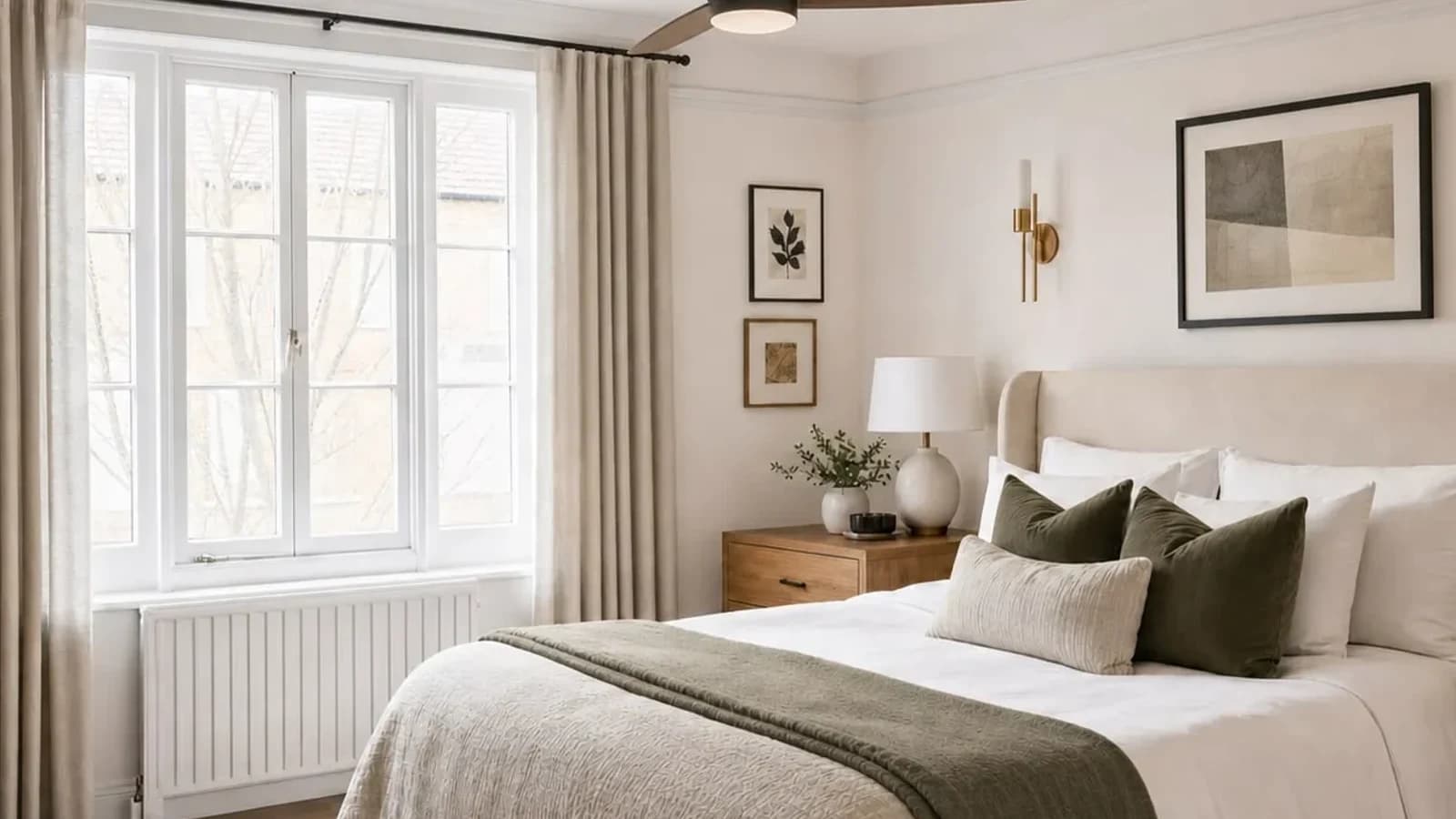
AI interior design is useful for comparing style, palette, visual balance, and broad furniture direction in a recognizable room. It cannot verify room dimensions, product identity, furniture fit, material color, construction feasibility, or the way daylight will affect a finished space. Treat each preview as a visual hypothesis: compare it with the source photo, then measure the room, inspect physical samples, and check current product specifications before you buy or build.
| Decision | How much to trust | What to verify |
|---|---|---|
| Style and mood | Useful for comparison | Whether it suits the room in person |
| Palette | Useful as a direction | Physical samples in real light |
| Architecture | Compare carefully | Openings, fixed elements, ceiling, floor |
| Furniture scale | Approximate only | Dimensions, clearances, circulation |
| Products and materials | Visual references | Identity, specifications, stock, care |
| Construction or safety | Do not approve | Site conditions, code, qualified review |
What does accuracy mean for an AI room preview?
Visual continuity means the result still reads as your room. Decision usefulness means it answers the question you asked. Physical accuracy means dimensions, materials, products, clearances, and construction details match reality. A photo-based generator can perform well on the first two while failing the third because one photograph is not a complete measured model.
Research on single-image room-layout reconstruction shows the amount of inference required even to estimate a shell. A useful preview is therefore a visual proposal, not a survey. For the complete workflow, read how AI interior design from a photo works.
A documented Room Foundry accuracy test
We reviewed one Room Foundry-owned bedroom photograph and the verified Room Foundry-generated preview made from it. This is a qualitative visual audit, not a benchmark or measured accuracy rate: no dimensioned survey, material samples, product records, or installation outcome were available for comparison.
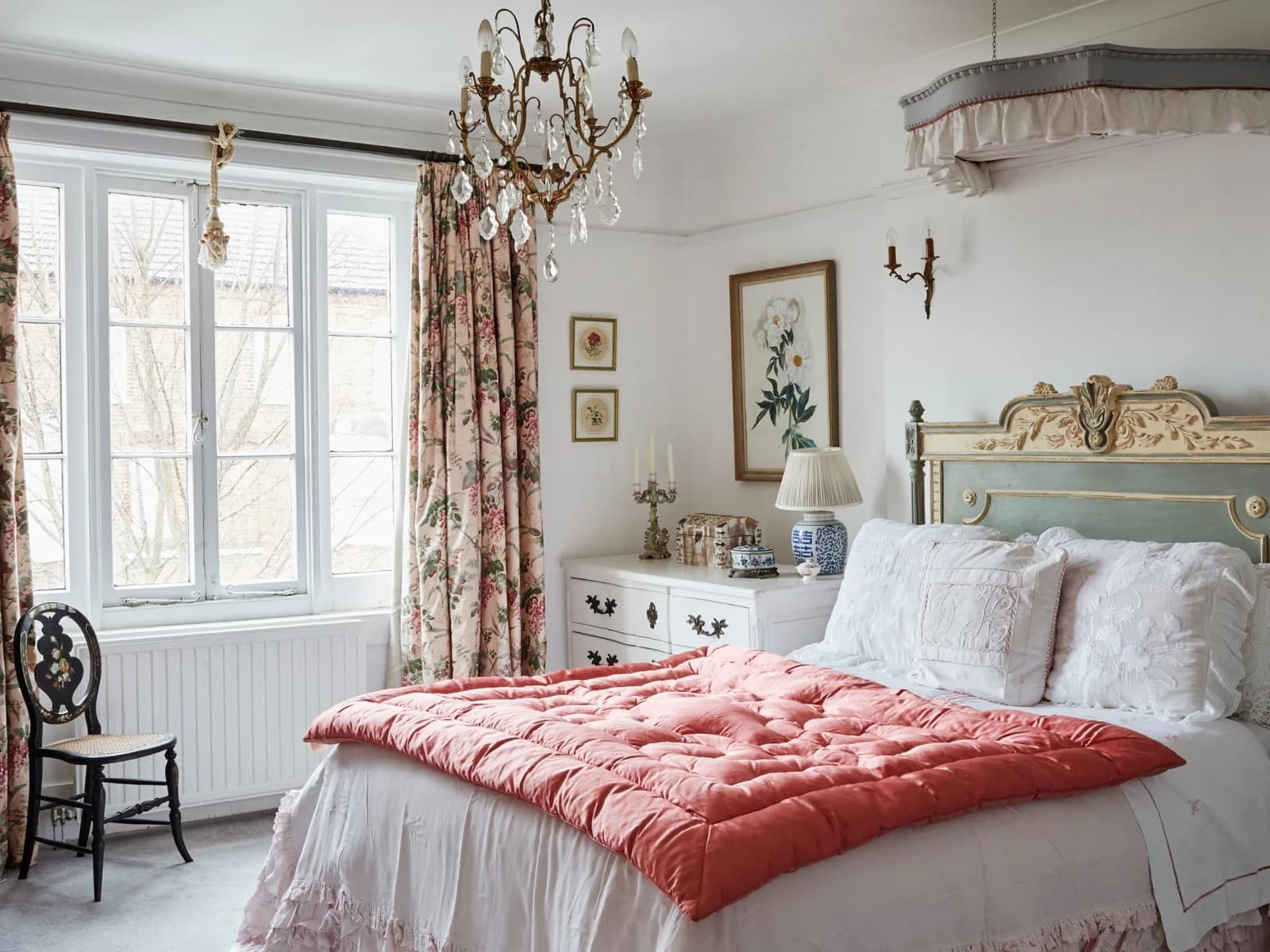 before
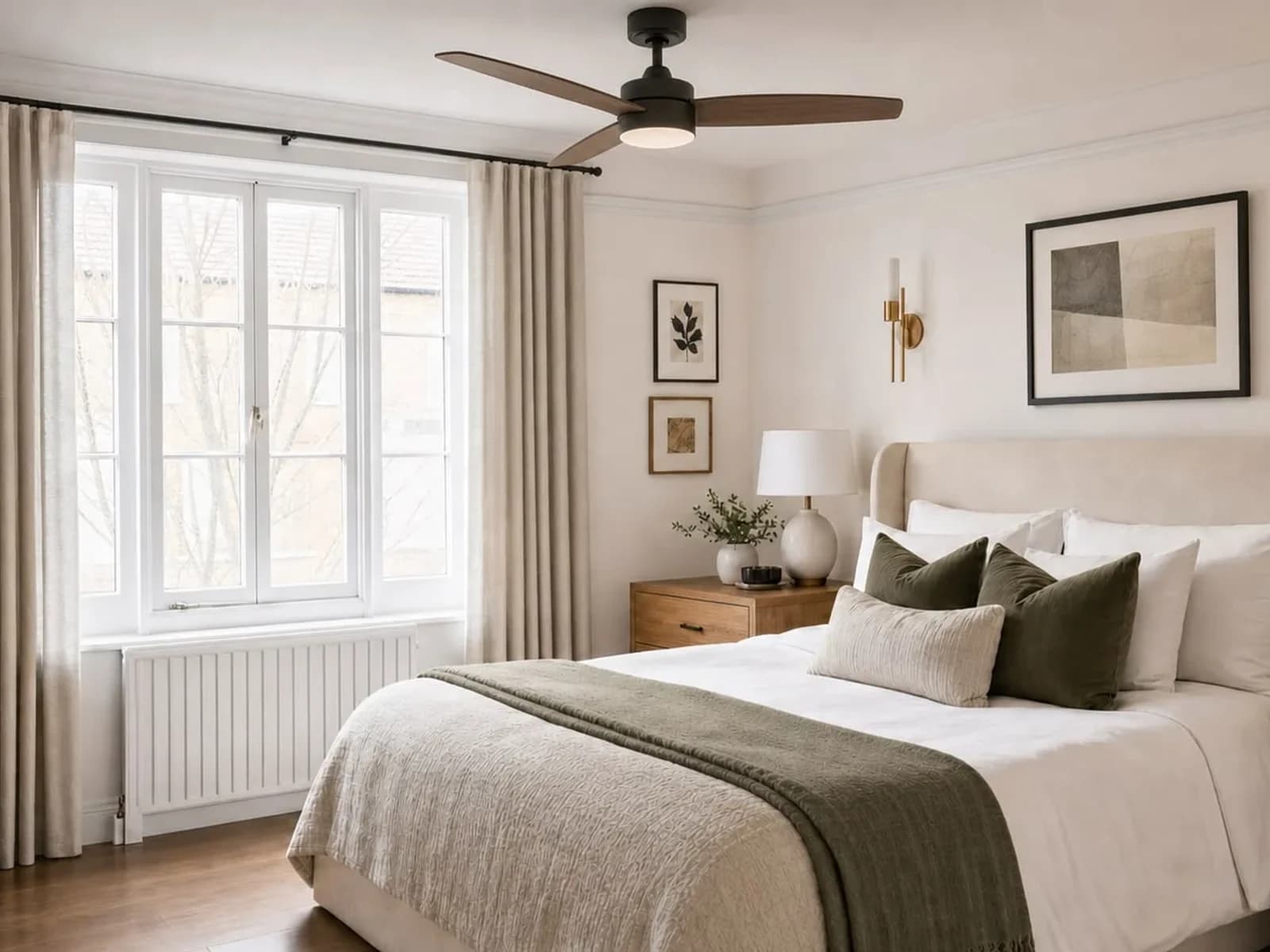 after
after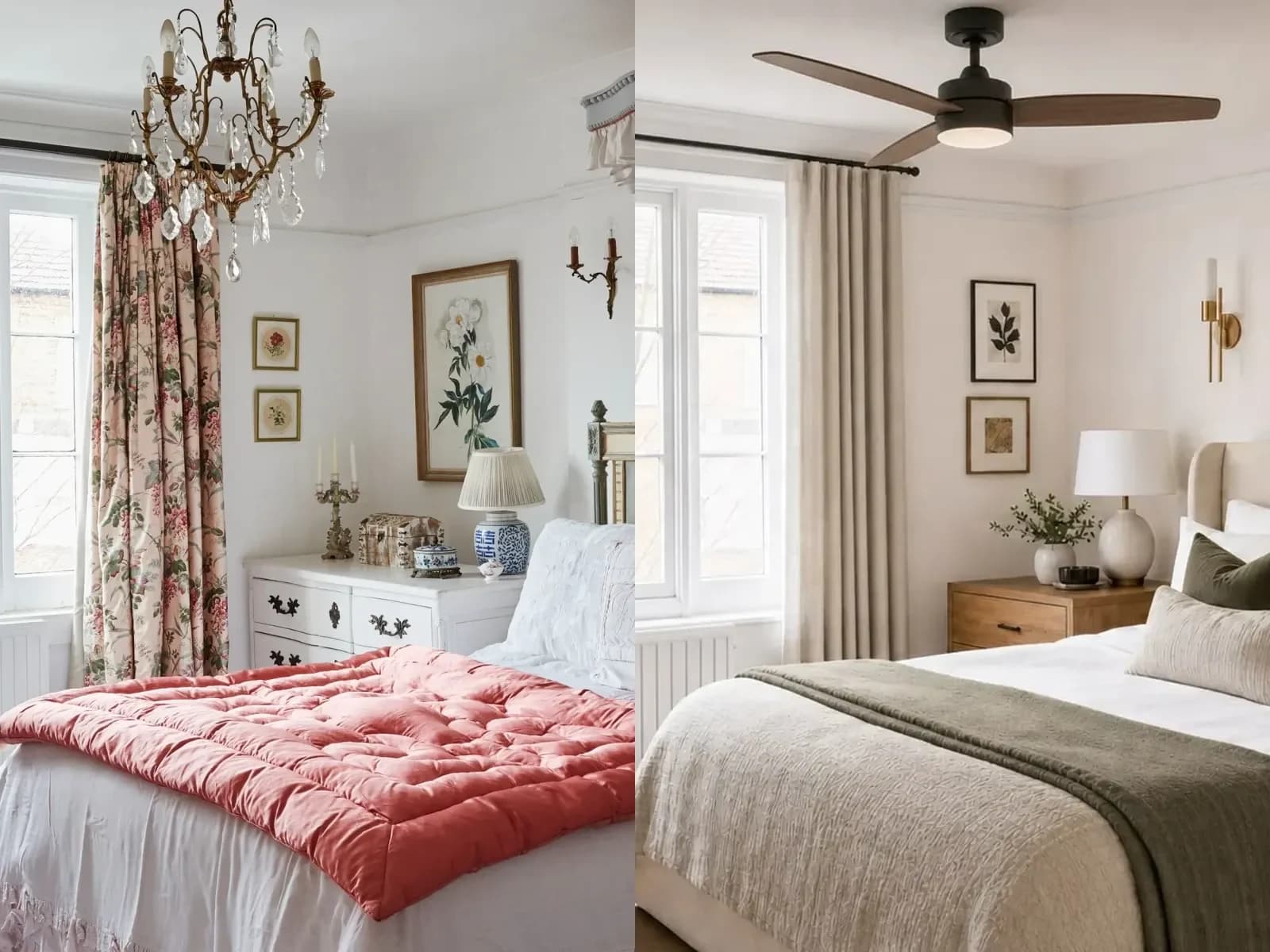
What stayed recognizable
The room remains a bedroom viewed from a similar corner toward the same broad window wall. The multi-panel window, radiator below it, wall-to-ceiling relationship, and bed beside the window connect the result to the source. The preview clearly answers a style question through neutral bedding, olive accents, simpler art, and warm wood.
Where the preview drifted
The carpet became wood flooring. The crystal chandelier became a ceiling fan. The ornate bed and headboard were replaced. The fabric canopy disappeared. Curtains, furniture, art, and sconces changed. The window and radiator remain recognizable, but their apparent proportions are not exact enough to measure from. If any changed feature were non-negotiable, this version would need revision or rejection.
What the test cannot tell us
The images cannot confirm room dimensions, bed clearance, curtain mounting, radiator-safe textile placement, fan clearance, electrical feasibility, product identity, material composition, color match, budget, or completed outcome. The after is evidence of a visual proposal and of the need for a source-to-preview audit.
Six accuracy checks to run on every AI room design
1. Perspective: did the camera or room quietly move?
Compare wall corners, ceiling lines, window edges, floor area, and relative object sizes. A result may look larger because it effectively widens the lens, raises the ceiling, moves the camera, or changes the crop. If the viewpoint shifts, do not use apparent distances as evidence of fit.
A clearer source makes comparison easier, though it does not create exact scale. Use the guide to take a better room photo for AI design.
2. Scale: does the furniture look plausible rather than proven?
An object can look proportionate while being physically impossible. Measure wall spans, openings, retained pieces, walking paths, door swings, radiator and vent clearance, and the delivery route. Compare those numbers with current manufacturer specifications. A screenshot is not a measuring tool.
For a product-specific check after choosing a furniture direction, use the furniture preview verification guide to confirm identity, dimensions, clearances, delivery access, color, stock, and fit.
3. Architecture: what fixed features were altered?
Check windows, doors, ceiling shape, molding, floor, fireplace, radiator, vents, built-ins, outlets, and visible structure before judging decoration. Treat invented openings, removed systems, relocated windows, and structural work as unapproved concepts requiring site evidence and qualified review.
4. Products: is the object real, current, and right for the room?
Translate a generated object into a specification such as width range, seat height, upholstery family, durability need, and budget. Then verify identity, dimensions, materials, finish, availability, price, shipping, assembly, warranty, and returns at the current source.
5. Materials and color: does the screen match the sample?
Use the preview to choose a material family, not a final sample. View physical paint, fabric, wood, and stone beside existing finishes in morning, afternoon, and artificial light. Confirm care and performance requirements separately.
6. Lighting: is the mood masking real conditions?
Generated light can create attractive brightness without a credible source. Compare windows, shadows, fixture locations, and dark corners. Verify real output, color rendering, plug and junction-box locations, switching, mounting, glare, and any need for an electrician.
Use a green, yellow, red trust model
| Zone | Use the preview for | Do next |
|---|---|---|
| Green: explore | Style, mood, contrast, accessory density | Compare versions |
| Yellow: investigate | Layout, rug coverage, curtains, lighting, materials | Measure, sample, price, verify |
| Red: never approve | Structure, wiring, plumbing, code, safety, exact fit | Use qualified review and real evidence |
The NIST Generative AI Profile emphasizes evaluating validity and reliability for the intended use, with human oversight and appropriate expectations. In room design, the lower-risk use is exploring directions; the higher-risk use is treating a plausible image as proof.
How to make an AI room preview more reliable
- Photograph the room level, clearly, and without extreme lens distortion.
- State the decision the preview should answer.
- Separate fixed architecture, must-keep items, and flexible layers.
- Compare the source and result before evaluating beauty.
- Reject versions that change a non-negotiable feature.
- Revise one mismatch at a time and restate what must remain unchanged.
- Use a second photo or measured sketch when one view hides context.
- Translate generated objects into categories and measured requirements.
- Verify every purchase, installation, safety, and construction decision outside the image.
Use a constraint-first AI room design prompt to establish what stays, what may change, and what must be avoided.
If preserving a particular bed, sofa, rug, or finish matters most, use the deeper guide to keeping existing furniture in an AI redesign.
Frequently Asked Questions
Trust the direction, verify the decision
The right question is whether the image is accurate enough for the decision in front of you. A recognizable preview that helps reject one palette and choose another can be valuable. The same image becomes risky when used as evidence that a sofa fits, a wall can move, or a product exists. Audit the result, keep the idea that survives comparison, then measure, sample, verify current products, and involve qualified professionals where the stakes require it.
FAQ
Common questions
- How accurate is AI interior design from one photo?
- It can be useful for visualizing style, palette, and broad furnishing direction in a recognizable room. One photo does not supply a complete measured model, so dimensions, scale, hidden conditions, exact materials, products, and feasibility still require verification.
- Can AI measure a room from a photo?
- Do not rely on a standard generated preview to measure a room. Measure the actual room, openings, furniture, clearances, and delivery route before making a purchase or installation decision.
- Why does AI change windows, floors, or furniture?
- Generative systems synthesize a new image from the source and instructions rather than placing objects on an immutable measured model. State non-negotiables clearly, compare every result with the source, and reject or revise versions that change them.
- Are products in an AI room design real?
- Not necessarily. Treat depicted objects as visual references unless a separate current source verifies a specific product. Check identity, dimensions, materials, price, stock, delivery, and returns.
- Can an AI room preview replace an interior designer or contractor?
- No. It can make early preferences easier to discuss, but it cannot replace professional judgment for space planning, specifications, construction, systems, safety, code, procurement, or installation.
Keep exploring
Related reading
AI Room Design
Room Foundry vs. REimagineHome: Which AI Room Design Tool Fits Your Project?
AI Room Design
AI Interior Design vs. an Interior Designer: Which One Do You Need?
Living Room Ideas
What Size Rug Does Your Living Room Need? A Visual Guide
Bedroom Ideas
How to Redesign a Bedroom Without Replacing the Bed
Living Room Ideas
How to Redesign a Living Room Around an Existing Sofa
AI Room Design
AI Interior Design From a Photo: How It Works and What to Expect
AI Room Design
How to Take the Best Photo for an AI Room Redesign
AI Room Design
30 AI Room Design Prompts for More Realistic, Useful Results
AI Room Design
Can AI Redesign a Room While Keeping Your Existing Furniture?
AI Room Design
Can AI Show Furniture in Your Room? What a Preview Can and Cannot Confirm
AI Room Design
AI Room Design Apps From a Photo: A Decision Checklist
Try Room Foundry
Explore the direction. Verify the real-world decision.
Upload a photo, name what should stay, and create your first Room Foundry preview free—then measure, sample, and confirm before you buy.
Upload a photo and preview free