Can AI Redesign a Room While Keeping Your Existing Furniture?
See how AI room design from a photo can keep existing furniture. Use a four-step workflow and audit Room Foundry-owned before-and-after examples.
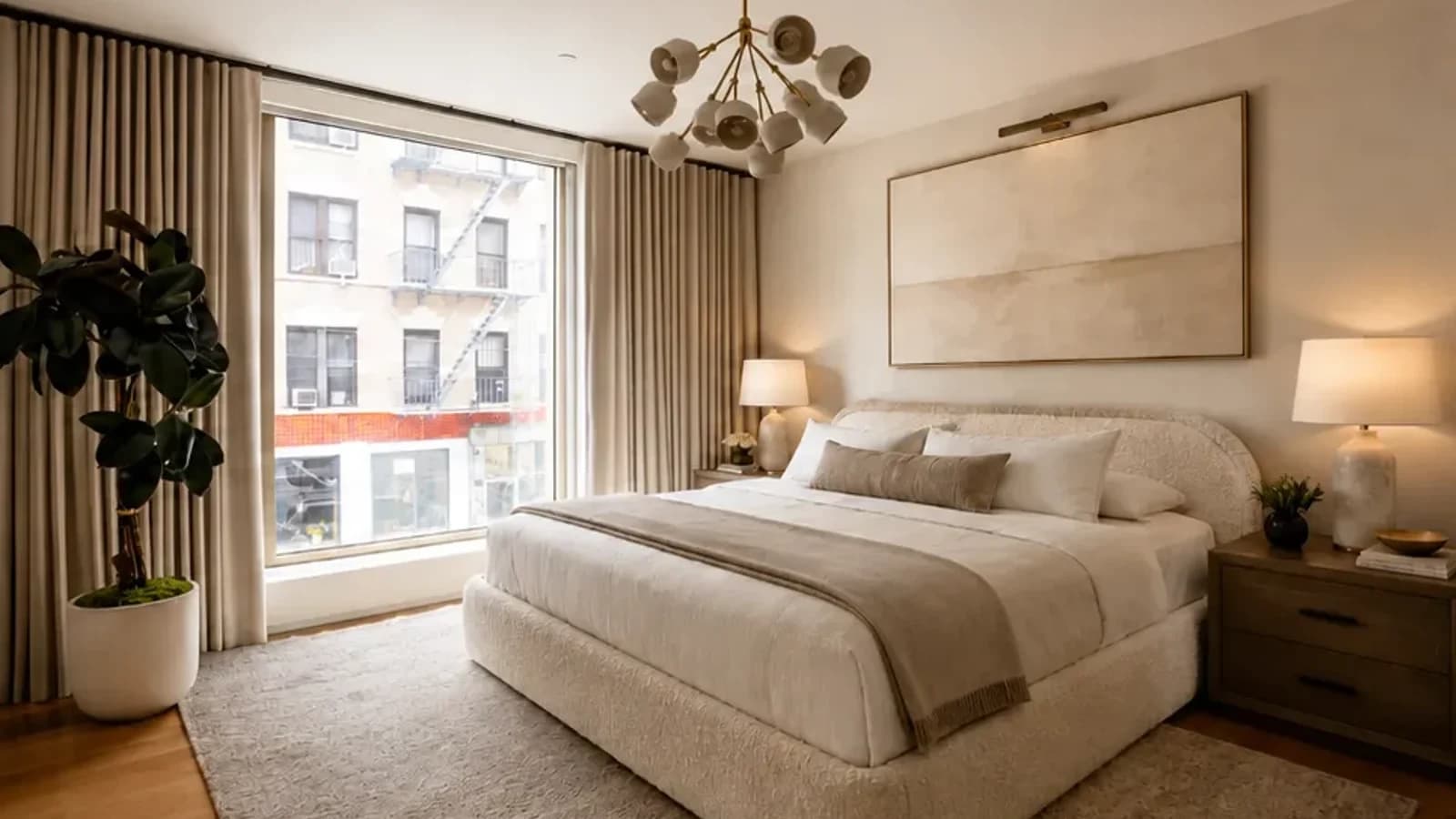
To use AI room design from a photo while keeping existing furniture, upload a clear view, mark each bed, sofa, rug, finish, or architectural feature that must stay, limit the categories allowed to change, then compare the preview with the source. Room Foundry can use those keep-item choices as design constraints, but the output is still a visual concept, not a guarantee. Revise any drift and verify measurements, products, materials, safety, and installation in the real room.
The Keep-Item Workflow From Photo to Plan
| Step | What to do | What to check |
|---|---|---|
| 1. Upload | Use a clear, level photo with every keep-item visible | The room shell, openings, floor, and furniture are readable |
| 2. Mark | Choose the room and style, select the items to preserve, and add a short note when needed | Each non-negotiable has a visible identity, position, and orientation |
| 3. Compare | Place the preview beside the source before judging the styling | Architecture and keep-items remain recognizable; only allowed categories changed |
| 4. Verify | Translate the useful direction into measurements, samples, and current product requirements | Fit, materials, safety, construction, and installation work in the real room |
That workflow matters because most people are not starting with an empty room.
You may love your bed but dislike everything around it. Your sofa may be expensive, comfortable, and only a few years old. Your home may have hardwood floors, built-in shelving, large windows, or a fireplace that cannot simply be moved. You might also be renting and unable to change the flooring, cabinetry, or structure of the space.
A useful AI room redesign should work with those realities. It should not replace everything you own, move the windows, change the proportions of the room, and produce a beautiful image of a space that no longer resembles your home.
| Priority | What belongs here | How to describe it |
|---|---|---|
| Fixed | Windows, doors, floor, ceiling, fireplace, built-ins | Preserve exact location, shape, finish, and viewpoint |
| Must keep | Bed, sofa, rug, dresser, art, heirloom | Preserve visible shape, color, scale, position, and orientation |
| Flexible | Bedding, lamps, curtains, tables, paint, decor | Name the categories allowed to change |
| Verify | Fit, products, materials, safety, construction | Check outside the generated image |
Room Foundry lets you upload a photo of your actual space, choose a design direction, and identify the furniture, finishes, or architectural features you want to preserve. The Room Foundry AI room design page explains the product workflow before you upload. The goal is to create a more finished version of your real room, not a generic fantasy interior.
Why Most People Do Not Want to Replace Everything
Complete room makeovers look impressive in magazines and social media posts, but they are not how most people actually decorate.
Real rooms come with constraints.
A bedroom may already have a perfectly good bed and dresser. A living room may contain a sofa that needs to stay because replacing it would cost thousands of dollars. A rental apartment may have flooring, cabinets, doors, and wall colors that cannot be permanently changed.
Even homeowners planning a significant refresh rarely want to remove every recognizable part of the room.
They usually want help answering more practical questions:
- How can I make this bed work with a different style?
- What rug would make the existing sofa look better?
- Can the room feel warmer without changing the floors?
- What should go around the fireplace?
- How would different curtains, lighting, and wall art change the space?
- Can I update the room without replacing the furniture I already like?
This is where AI room design becomes genuinely useful. Instead of treating the existing room as something to erase, it can help you explore how selected changes could improve the whole space.
If you are deciding which kind of tool fits that goal, see our Room Foundry vs RoomGPT comparison for a closer look at inspiration-first and preservation-focused workflows.
What Can an AI Room Redesign Keep?
AI room design tools work from the visual information in an uploaded photo. Depending on the platform and the instructions you provide, a redesign can attempt to preserve a wide range of existing details.
Beds and Bedroom Furniture
A bed is often the largest and most expensive item in a bedroom. It also establishes the layout of the entire space.
When the bed needs to stay, the redesign can focus on changing what surrounds it:
- Bedding
- Pillows and throws
- Nightstands
- Lamps
- Area rugs
- Curtains
- Wall color
- Artwork
- A bench or accent chair
- Decorative accessories
This makes it possible to explore a completely different bedroom style without pretending you are buying a new bed.
For example, the same upholstered bed could work in a warm-modern room with layered cream bedding, an organic-contemporary room with natural wood accents, or a moody bedroom with darker walls and richer textiles.
You can also see how this works in a real bedroom makeover preview that keeps the room recognizable while changing the design direction.
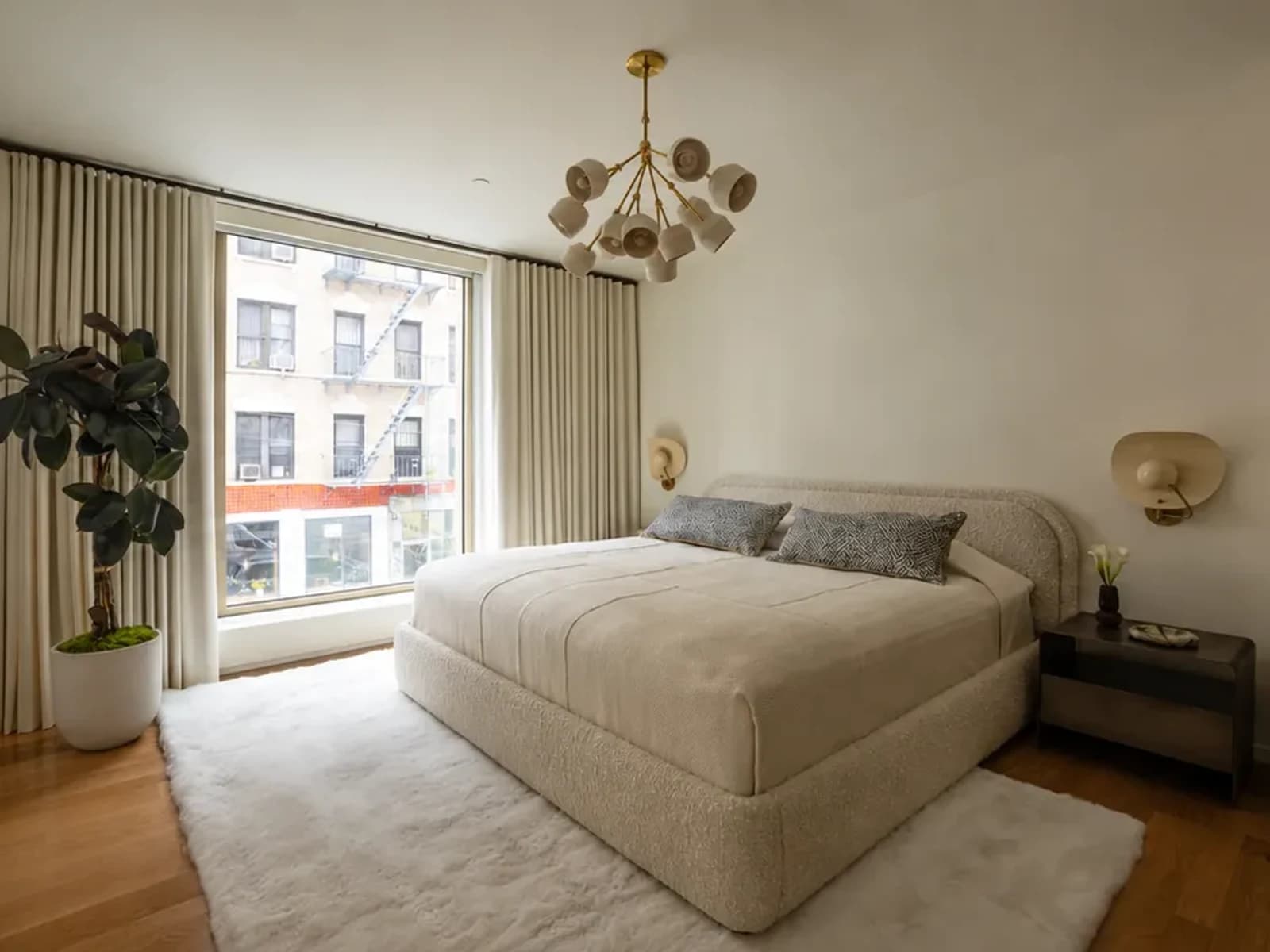 before
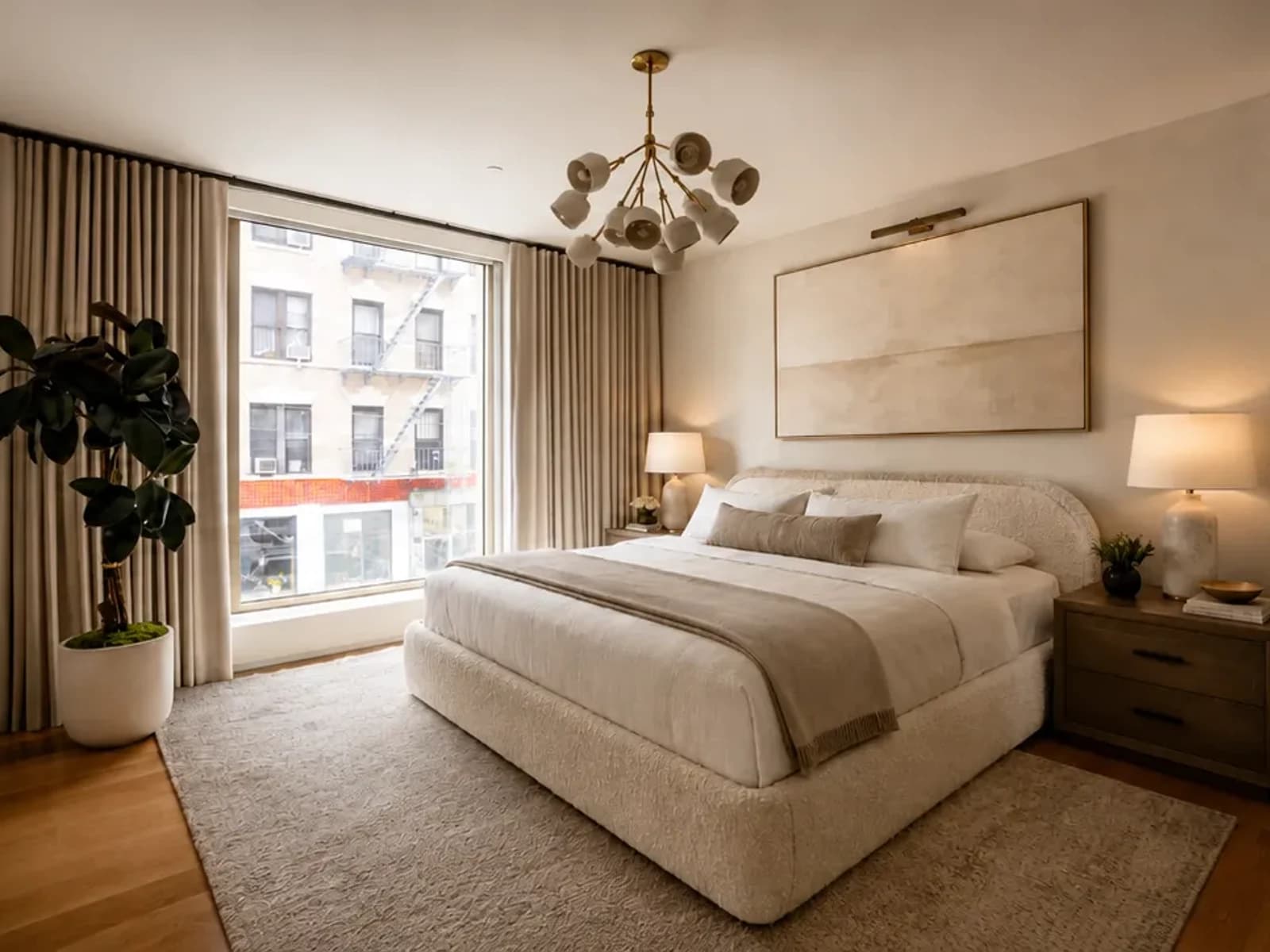 after
after| Verified bed-example audit | Evidence |
|---|---|
| Stayed recognizable | Upholstered bed, broad window, wood floor, chandelier, plant, and camera relationship |
| Changed in the concept | Bedding, rug, nightstands, lamps, art, and warmer styling |
| Still needs real-world verification | Bed and nightstand clearance, rug size, lamp scale, window operation, product specifications, and installation |
Sofas and Living Room Seating
A sofa is another item most people do not casually replace. It is often one of the largest purchases in the room and may still be in excellent condition.
An AI redesign can preserve the sofa and its general placement while updating the living room around it. Possible changes include:
- A different area rug
- New coffee and side tables
- Complementary accent chairs
- Curtains or other window treatments
- Floor and table lighting
- Wall art
- Paint colors
- Pillows and throws
- Shelving and decor
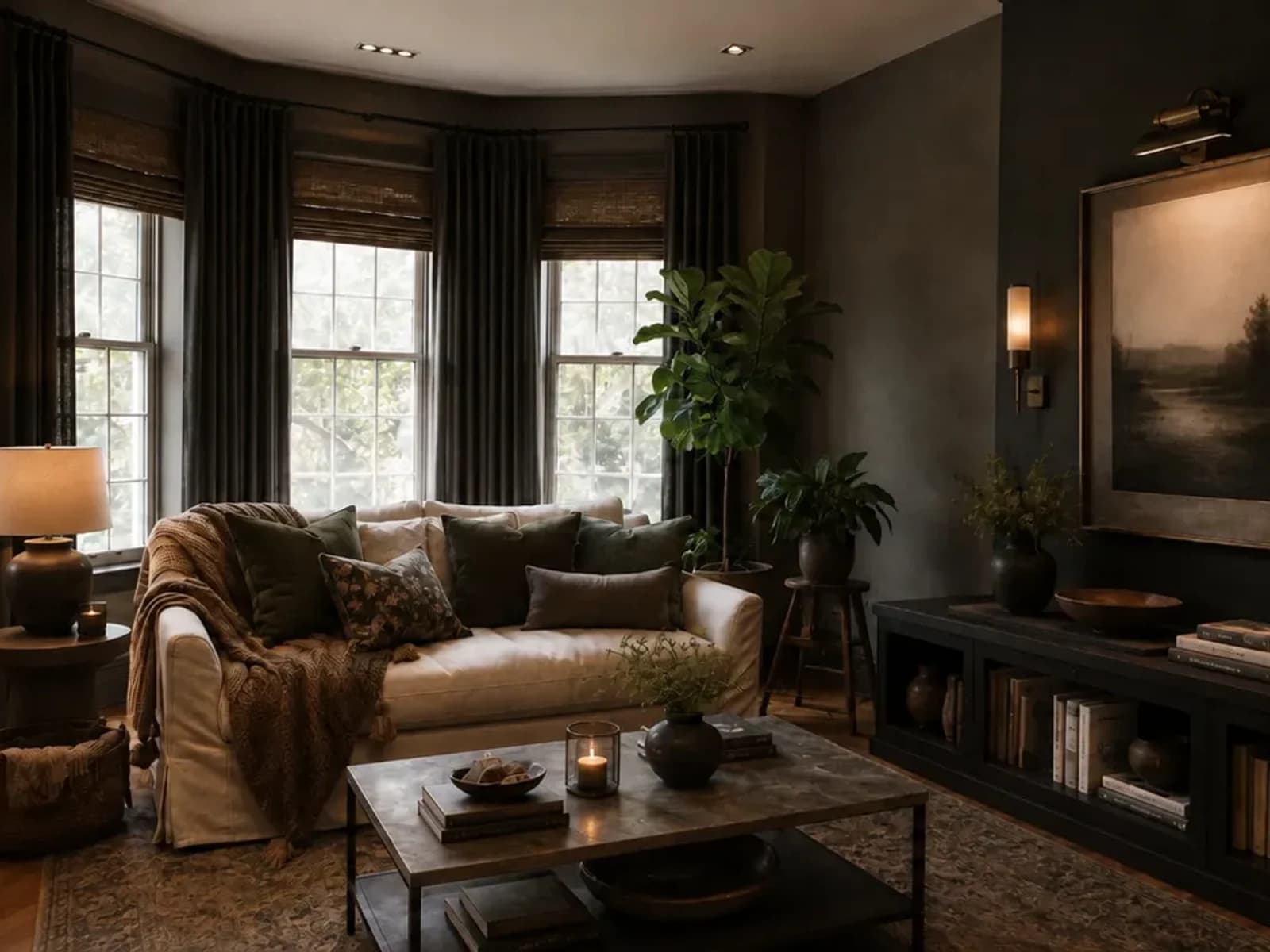
A sofa that currently feels disconnected from the room may look far more intentional once the palette, rug, lighting, and surrounding furniture work together.
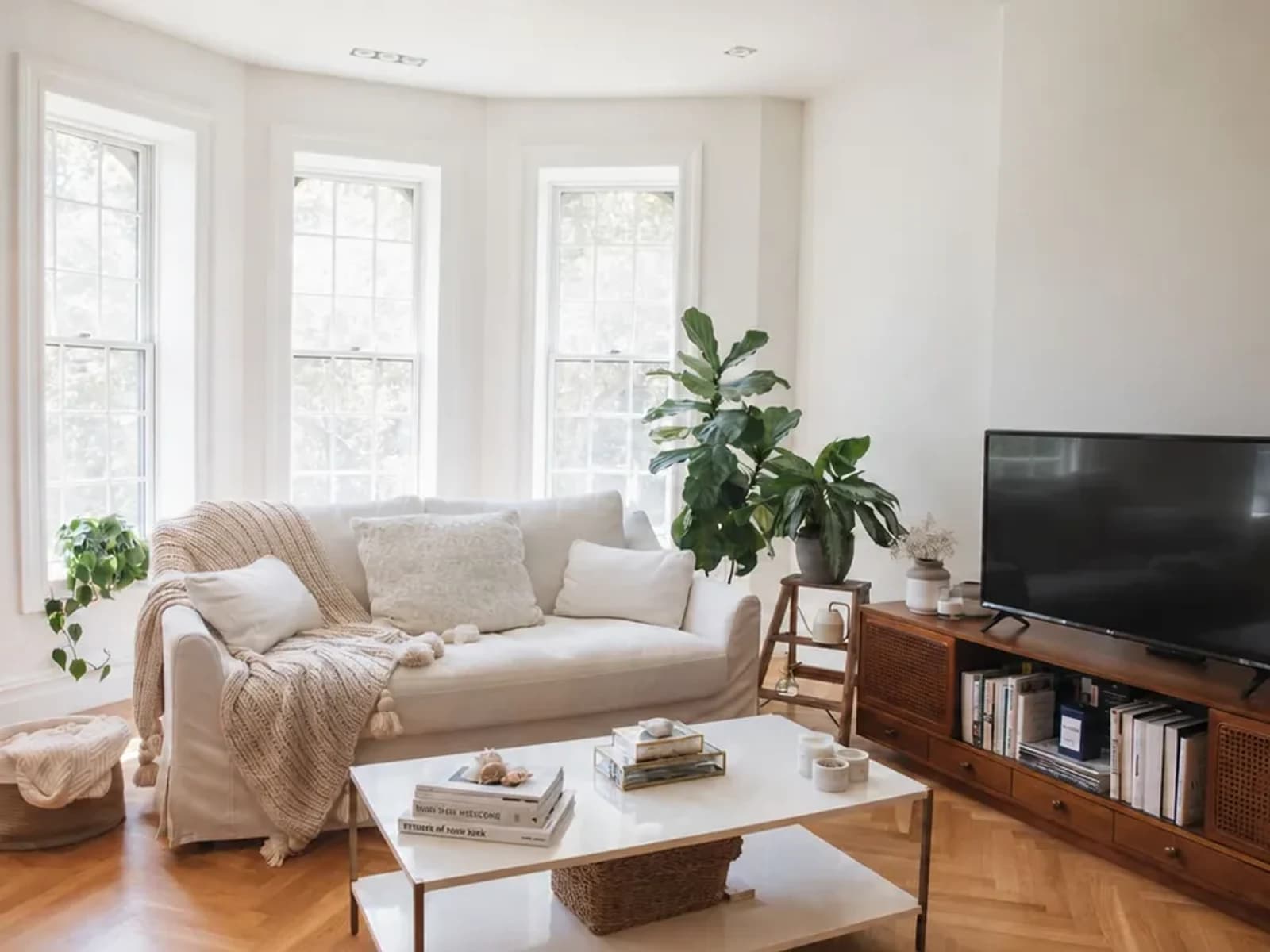 before
 after
afterWhat stayed: the cream sofa, bay-window rhythm, floor, television-wall relationship, and viewpoint. What changed: wall color, window treatments, rug, tables, lighting, art, pillows, and decor. What to verify: the sofa's exact color and shape, circulation, rug coverage, table clearances, fixture feasibility, and real material samples.
For another real-space example, explore this living room makeover preview built from the room someone actually uploaded.
Flooring
Hardwood, tile, carpet, and polished concrete often need to remain exactly where they are.
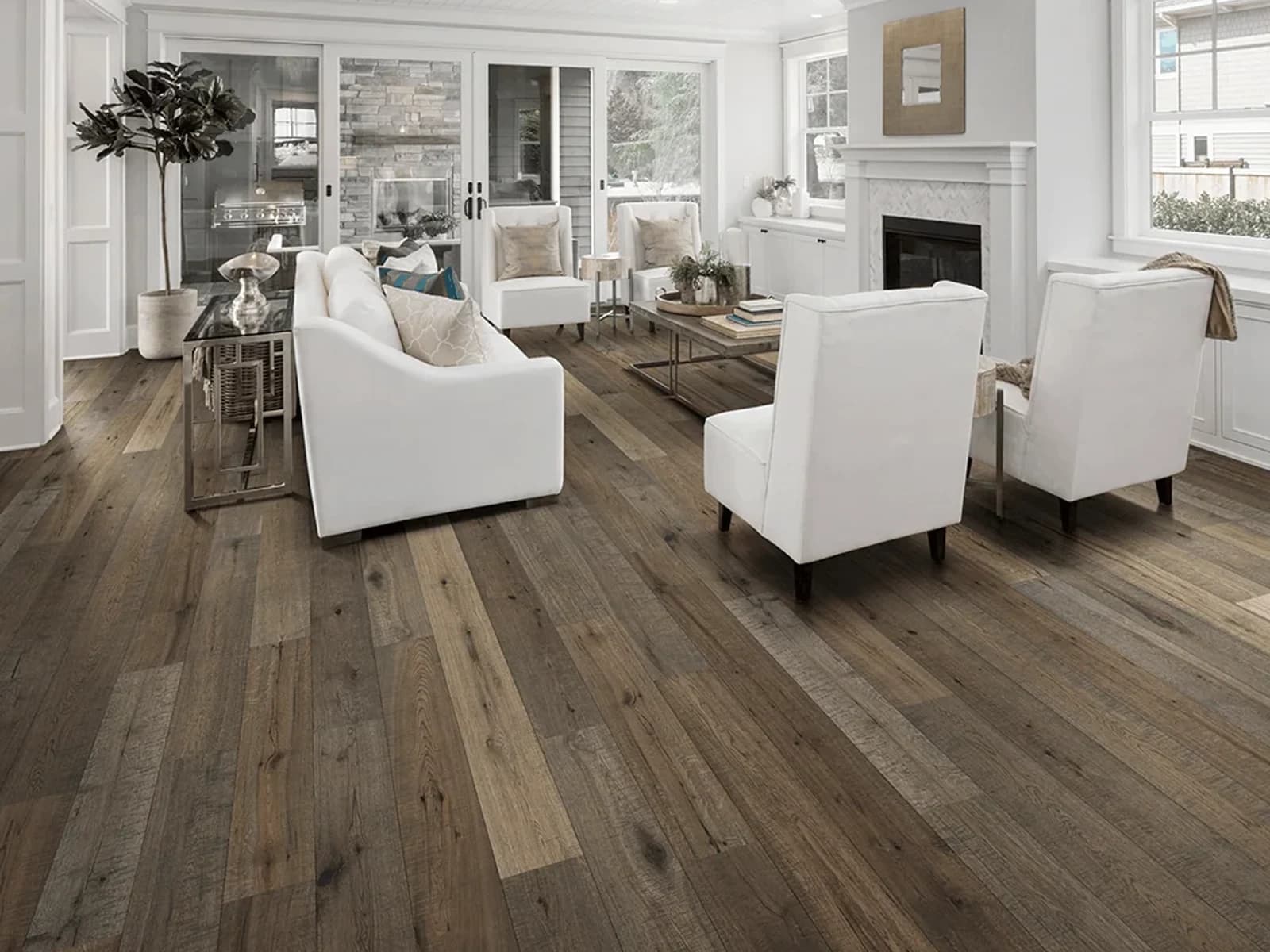
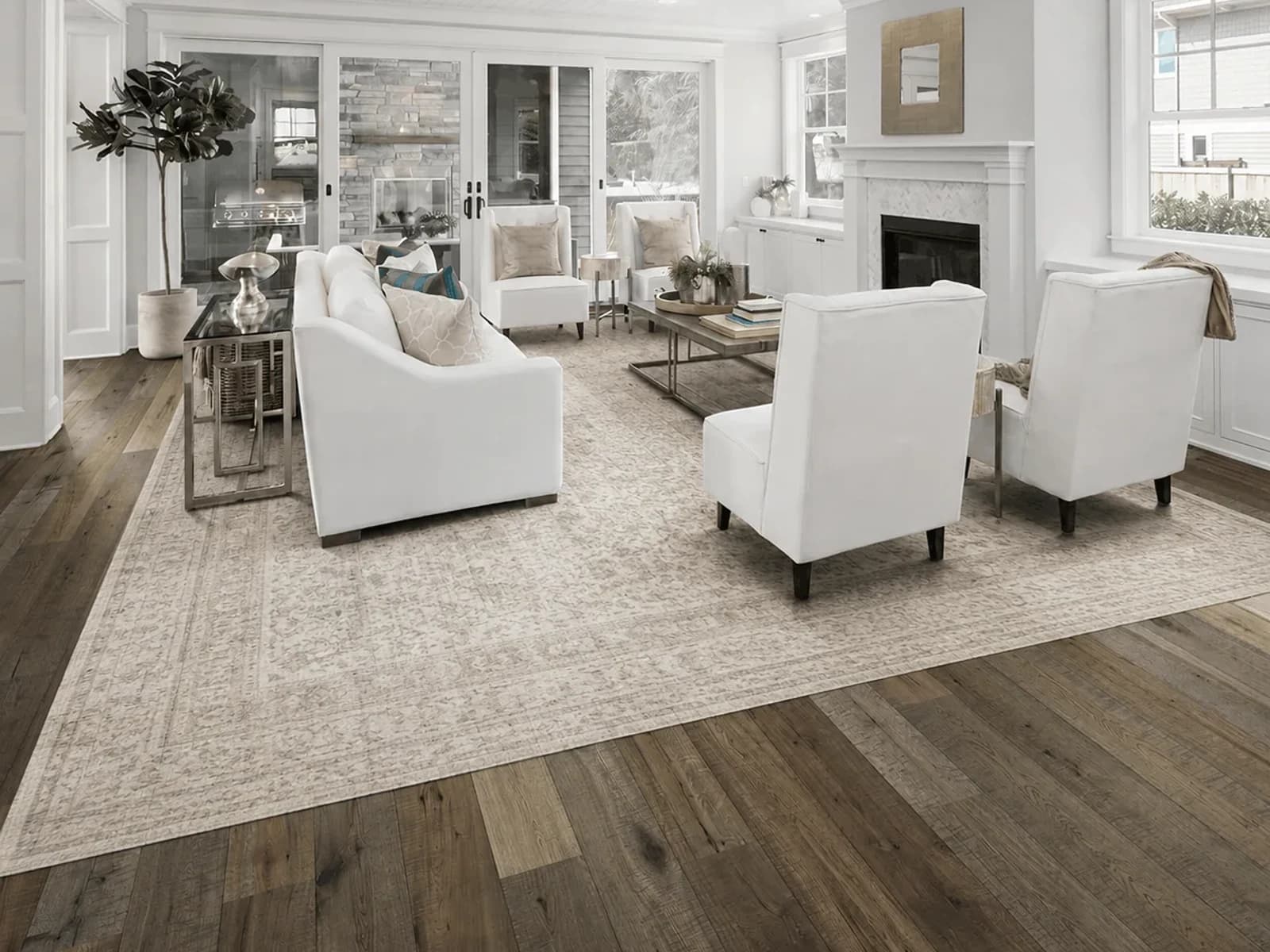
Preserving the flooring is especially important for renters and for homeowners who are not planning a major renovation. Rather than replacing it, an AI redesign can show how the room might work with rugs, furniture tones, wall colors, and materials that complement the existing floor.
If the floor needs to stay but the room needs more definition, a rug preview in your actual room can help you judge scale and visual impact before changing anything else.
 before
 after
afterWhat stayed: the plank pattern and tone of the hardwood floor, fireplace, windows, doors, built-ins, and furniture arrangement. What changed: a large light patterned rug was introduced. What to verify: the rug's measured footprint, door and fireplace clearance, chair placement, pile, color, care, and return terms. The image helps judge coverage; it does not supply a purchase size.
Fireplaces and Built-In Features
Architectural elements such as fireplaces, built-in shelves, ceiling beams, and wall paneling help define a room.
A realistic design should work around these fixed features instead of removing or relocating them. You might use AI to explore different artwork above a fireplace, a new seating arrangement around it, a different mantel treatment, or updated styling for built-in shelves.
Windows, Doors, and Room Structure
Windows, doors, walls, and ceilings are the bones of the room. Preserving them helps the redesign remain recognizable and possible to recreate.
AI is not perfect, and generated images may occasionally alter small architectural details. Clear instructions and a straight, well-lit source photo improve the likelihood that the overall room structure remains consistent.
Wall Colors, Rugs, and Favorite Pieces
You may also want to preserve smaller but personally important details:
- A wall color you already love
- A recently purchased rug
- A vintage dresser
- A family heirloom
- An artwork collection
- A dining table
- A favorite chair
- A specific light fixture
The more clearly you identify what needs to stay, the more focused the redesign can be.
How to Tell Room Foundry What You Want to Keep
The easiest way to produce a useful result is to be specific about what should stay and what is allowed to change.
For more copyable first-pass and revision language, use the AI room design prompt library.
Before prompting, follow the guide to take a clear room photo for AI design.
For the broader workflow from upload through verification, read how AI interior design from a photo works.
Use the companion guide on AI interior design accuracy to audit perspective, scale, architecture, products, materials, and lighting.
Instead of writing: Make this bedroom look better.
For a living room, you might write:
Clear directions reduce ambiguity. They tell the system which elements are fixed and which parts of the room are available for experimentation.
Room Foundry is designed to let users preserve important pieces while changing the style around them. This creates a more controllable process than generating an entirely different room with no connection to what you already own.
What Makes an AI Redesign Still Feel Like Your Room?
A redesigned room remains recognizable when its most important visual anchors stay consistent.
Those anchors usually include:
- The camera perspective
- The room dimensions
- Window and door placement
- Major architectural elements
- Fixed furniture
- Flooring
- The general layout
Imagine uploading a bedroom with a window on the right, a bed centered on the back wall, and a dresser across from it. If the generated result moves the window, rotates the room, and replaces the bed with a completely different piece, the image may look attractive, but it is no longer a useful preview of your bedroom.
A stronger result keeps the same underlying space:
- The bed remains centered on the same wall.
- The window stays in the same location.
- The flooring remains recognizable.
- The room retains the same dimensions and perspective.
- New bedding, lighting, art, rugs, and furniture create the updated look.
That is the difference between viewing general inspiration and seeing a plausible direction for your actual home.
Why Revisions Matter
Even with a strong initial request, the first redesign may not be the final answer.
Perhaps the room looks too dark. The rug may be too bold. The furniture could feel more formal than you intended. A preserved item might need to be represented more accurately.
That does not necessarily mean the entire concept failed. It may simply need refinement.
Useful revision requests include:
- Keep the same concept, but make the room warmer.
- Use lighter furniture and fewer dark accents.
- Keep the original bed more accurately.
- Make the rug more neutral.
- Change the curtains to full-length linen.
- Reduce the amount of decor.
- Make the room feel more traditional.
- Keep everything except the wall color.
- Try the same room in a Japandi style.
- Make the design less dramatic and more practical.
Room Foundry supports revisions so the design can move closer to what you actually want. The room stays within the same design session while each new version responds to more specific feedback.
This is particularly important when you are working around existing furniture. The first result establishes a direction; revisions help make that direction fit your room more closely.
Examples of Redesigning Around Existing Items
Keeping the Bed
You upload a bedroom with a dark upholstered bed that needs to stay. The redesign keeps that bed but introduces warm white bedding, oak nightstands, textured lamps, a large neutral rug, linen curtains, soft artwork, and a calmer color palette.
The result feels like a new bedroom without requiring the room's most important piece to be replaced.
Keeping the Sofa
You upload a living room with a gray sectional. Rather than replacing it, the redesign adds a warmer rug, wood and stone tables, cream accent chairs, layered lighting, more cohesive wall art, and pillows that connect the sofa to the new palette.
The sectional stops feeling like an obstacle and becomes part of the finished design.
Keeping the Flooring
You upload a rental bedroom with gray carpet that cannot be changed. The redesign works around it with warmer walls, a layered rug, natural wood furniture, cream bedding, soft curtains, and lighting that reduces the cold appearance of the floor.
Keeping the Fireplace
You upload a living room with a brick fireplace. The redesign preserves it and explores a new seating arrangement, different mantel styling, artwork or a mirror above it, updated lighting, and a rug that anchors the furniture around the fireplace.
Tips for Better AI Room Redesign Results
Start with a clear photo taken from a position that shows most of the room. Natural daylight usually helps the system understand furniture, edges, materials, and architectural details.
Avoid extreme zoom, heavy filters, or unusual camera angles when possible.
Before generating, separate your preferences into three groups:
Must stay
Bed, sofa, flooring, fireplace, windows, cabinets, wall color, or favorite furniture.
Can change
Rug, lighting, bedding, curtains, tables, art, decor, paint, or accent furniture.
Design direction
Warm modern, traditional, coastal, Japandi, organic contemporary, moody, minimal, eclectic, or another clearly defined style.
A request containing those three elements gives the redesign a much clearer job.
If that direction is Japandi, our complete Japandi style guide explains the colors, materials, furniture, and lighting that make the look work.
AI previews are visual planning tools rather than construction documents. They can help establish style, color, furnishing, and decor direction, but dimensions, product fit, structural work, and renovation feasibility should still be verified before making major changes.
Is AI Room Design a Replacement for an Interior Designer?
Not entirely.
A professional interior designer can measure a room, develop floor plans, choose exact materials, coordinate contractors, manage budgets, and solve technical problems. AI does not replace those services.
AI room design is most useful earlier in the process, when you are trying to understand what direction you prefer.
It can help you:
- Explore styles quickly
- Compare different visual approaches
- Work around existing furniture
- Communicate your preferences
- Refine an initial idea
- Create a clearer starting point
Some people may use it before working with a designer. Others may use it for smaller room updates they plan to handle themselves.
Either way, the value is speed and visualization: seeing multiple possible versions of your actual room without beginning from a blank page.
How to Redesign Your Room While Keeping What Matters
- Upload a photo of your actual room.
- Choose a design style or direction.
- Identify the furniture and features you want to keep.
- Generate your redesign preview.
- Review the result and request revisions as needed.
- Use the finished direction to guide your room makeover.
Your first preview is free, and no credit card is required.
Final Thoughts
AI room design is most useful when it respects the reality of the room you already have.
You should not need to replace a good bed, an expensive sofa, hardwood flooring, or the architectural character of your home just to explore a different style.
Room Foundry is designed to help you keep those important pieces and redesign around them. The result can still feel fresh, polished, and dramatically different without becoming a room that bears no resemblance to yours.
The goal is not to erase your space.
Frequently Asked Questions
Can AI redesign a room while keeping my furniture?
Yes. You can identify the furniture you want to preserve and ask the AI to redesign the surrounding space. Clear instructions and a good source photo generally produce more useful results.
Can I keep my bed in an AI bedroom redesign?
Yes. Room Foundry can redesign the bedroom around your existing bed by changing elements such as bedding, nightstands, rugs, lighting, curtains, paint, artwork, and decor.
Can AI preserve my sofa and living room layout?
AI can use the uploaded image and your instructions to preserve the sofa and overall room layout while changing the surrounding design. Generated previews may not reproduce every detail perfectly, so revisions can help improve the result.
Can I keep my flooring or fireplace?
Yes. You can specify that fixed elements such as flooring, fireplaces, windows, built-ins, or wall colors should remain unchanged.
Can I revise the first design?
Yes. Room Foundry supports revisions and same-room style changes, allowing you to adjust the initial concept instead of beginning again.
Will the result look exactly like my room?
Room Foundry starts with your actual uploaded photo and is designed to keep the room recognizable. AI-generated images can occasionally alter smaller details, but preserving the room's major furniture, layout, and architectural features is a core part of the intended experience.
Is Room Foundry free to try?
Yes. Your first preview is free, and no credit card is required.
FAQ
Common questions
- Can AI redesign a room while keeping my furniture?
- Yes. You can identify the furniture you want to preserve and ask the AI to redesign the surrounding space. Clear instructions and a good source photo generally produce more useful results.
- Can I keep my bed in an AI bedroom redesign?
- Yes. Room Foundry can redesign the bedroom around your existing bed by changing elements such as bedding, nightstands, rugs, lighting, curtains, paint, artwork, and decor.
- Can AI preserve my sofa and living room layout?
- AI can use the uploaded image and your instructions to preserve the sofa and overall room layout while changing the surrounding design. Generated previews may not reproduce every detail perfectly, so revisions can help improve the result.
- Can I keep my flooring or fireplace?
- Yes. You can specify that fixed elements such as flooring, fireplaces, windows, built-ins, or wall colors should remain unchanged.
- Can I revise the first design?
- Yes. Room Foundry supports revisions and same-room style changes, allowing you to adjust the initial concept instead of beginning again.
- Will the result look exactly like my room?
- Room Foundry starts with your actual uploaded photo and is designed to keep the room recognizable. AI-generated images can occasionally alter smaller details, but preserving the room's major furniture, layout, and architectural features is a core part of the intended experience.
- Is Room Foundry free to try?
- Yes. Your first preview is free, and no credit card is required.
Keep exploring
Related reading
AI Room Design
Room Foundry vs. REimagineHome: Which AI Room Design Tool Fits Your Project?
AI Room Design
AI Interior Design vs. an Interior Designer: Which One Do You Need?
Bedroom Ideas
Warm Modern Bedroom Ideas That Feel Elevated, Not Beige
Living Room Ideas
A Renter-Friendly Living Room Makeover You Can Undo
Living Room Ideas
Small Living Room Ideas That Do Not Require New Furniture
Living Room Ideas
What Size Rug Does Your Living Room Need? A Visual Guide
Bedroom Ideas
How to Redesign a Bedroom Without Replacing the Bed
Living Room Ideas
How to Redesign a Living Room Around an Existing Sofa
AI Room Design
AI Bedroom Design From a Photo: A Practical Step-by-Step Guide
AI Room Design
AI Interior Design From a Photo: How It Works and What to Expect
AI Room Design
How to Take the Best Photo for an AI Room Redesign
AI Room Design
How Accurate Is AI Interior Design? What to Trust and What to Verify
AI Room Design
30 AI Room Design Prompts for More Realistic, Useful Results
AI Room Design
AI Living Room Design From a Photo: A Practical Step-by-Step Guide
AI Room Design
Room Foundry vs RoomGPT: Features and Workflow Compared
Interior Design Styles
Japandi Style: How to Create a Calm, Minimal, and Warm Home
Interior Design Styles
Organic Modern Style: How to Get the Look Without Replacing Your Room
Small Spaces & Dorm Rooms
15 Modern Dorm Room Ideas for a Small College Bedroom
Small Spaces & Dorm Rooms
17 Coastal Dorm Room Ideas With a Rental-Safe Checklist
AI Room Design
Can AI Show Furniture in Your Room? What a Preview Can and Cannot Confirm
AI Room Design
AI Room Design Apps From a Photo: A Decision Checklist
Try Room Foundry
Redesign your room without replacing everything.
Upload your actual room, keep the pieces that matter, and see a more finished version of the same space.
Try your room free